Beyond the Agent: AI Operations, the Team Behind 20x Browser Agent Growth
Silna's mission is to streamline and accelerate insurance workflows so patients can access care faster. More than 75% of prior authorizations require submission through payor portals (the rest are via email or fax), making browser agents a key component of that effort.
Over the past two quarters, we have grown browser agent volume 20x, with agents now handling nearly 50% of all prior authorizations. In our first blog post, "Autonomous Browser Agents in the Enterprise," we outlined the building of core technical systems such as secure browser infrastructure, task orchestration, and credential pooling. In this post, we build on that foundation to show how we pair those technical components with operational systems to deploy and orchestrate browser agents that automate prior authorizations at scale.
Automating the First Portal
We started with a large commercial payor that had no OTP at login and a relatively simple navigation. Our team built a browser agent sandbox to backtest submissions without actually filing them, and partnered with our in-house authorization specialists to map every workflow, edge case, and fallback route. Understanding the downstream implications of each failure point was crucial: it let us design agents that could recover when a primary flow broke.
For weeks, we plateaued. The agent was poor at instruction-following, forgetting parts of its context mid-session. The breakthrough came with Anthropic's release of Opus 4.1, which delivered a step change in long-horizon instruction following. Edge case handling became more predictable, variance across runs dropped, and retries fell sharply. We hit over 90% completion and accuracy in production.
Proving Rapid Replication
The next question we focused on answering was whether this technical approach of natural language prompting with tool calls was a repeatable and scalable process that wouldn't take weeks on end for every new portal.
We identified a second portal with similar criteria, which was a small Medicaid MCO, a regional payor in California. After just a couple of hours, we achieved an end-to-end successful run using our existing primitives with Opus 4.1. This validated the approach we had built and made it clear that resourcing was the remaining constraint to achieve high velocity. Velocity would not only help us accelerate broad coverage faster, but also help us identify the unknowns and limitations around complicated edge cases which we were confident existed.
Scaling an AI Deployment Team
The fundamental question we needed to answer was how to increase our automation rollout velocity. Under the assumption that model capabilities and the tooling we had built stayed static, we calculated that it would take over 5,000 hours in configuration time to automate the breadth of our payor-specialty composition that required portals. We realized that we needed a dedicated team with a knack for problem-solving to ruthlessly execute on prompting, tool-building, and designing the systems that power the rollout of agents. While we are focused in this post on browser agents, our voice and document agents also fall within AI Operations' domain.
Deploying Browser Agents
Building Tools Across Different Portal Architectures
As we scaled up, the speed at which we discovered different edge cases also increased. For example, some healthcare portals display browser pop-ups that exist outside the agent's view, meaning that the agent wouldn't be able to interact with them. This would block the agent from interacting with the rest of the portal. We solved this by building a persistent guard that connects directly to the browser via Chrome DevTools Protocol, polling for and automatically dismissing these dialogs before they can block the agent. We also came across portals that disallow concurrency, and thus we needed to build a system for queuing agents. Different portals also have varying ways they enforce file uploads, whether it's 1 file at a time or a general file dump. We also needed to build differentiated file upload tools for our browser agents.
Some of the most complex insurance portal UIs also had aspects like layered iframes, masked input fields, and custom date pickers that did not behave like standard HTML elements. These were effectively invisible to certain browser-level automation tools, as standard DOM interaction would silently fail or produce the wrong result with no error to catch. For these, we deployed Anthropic's Computer Use Agent (CUA) as a subagent, allowing the agent to operate at the screen level itself, using coordinate-based actions the same way a human would with a mouse and keyboard. It's a lower-level primitive, but for portals that actively resist browser automation, it's the most reliable option.
Some portals were heavily conditional. Fields appeared based on previous answers, and no two submission flows looked alike. We couldn't pre-configure everything the agent might need because we didn't know what the portal would ask until mid-submission. So we built an in-agent document query tool: when the agent hits an unexpected field, it queries the clinical documents in real time, pulling relevant passages with direct quotes to answer the portal's question.
Our wealth of tools is also carefully curated for our agents so that not every agent has access to all these tools. Constraining the tools we give our agents not only improves their performance, but prevents context bloat from decreasing our reliability. We maintain a central tool registry where certain generalized tools are enabled by default and others are opt-in. When an agent run begins, it gets the explicit whitelist of available tools, so it can't even reason about other tools it doesn't have access to.
This was the start of a familiar process, discovering roadblocks to portal automation and then rapidly building tools and infrastructure to solve them. Over the past few months, we have been able to enumerate a wide range of browser agent issues and have started to see an exponential decay of roadblocks as we progressively built out primitives to handle these issues.
Resolving Credential Issues
As our first post touched on, a huge takeaway from our early work was that credentials are a critical part of our foundational infrastructure. We learned this when portals started locking accounts because agents were aggressively retrying failed logins. However, the fix wasn't just better retry logic, it was teaching the system to understand why a login failed. We now have a way to classify agent failures and increment a consecutive failure counter if the error classification is related to a login. After the counter reaches a threshold, the credential is automatically disabled from our agents and the Ops team is notified.
Measuring Agent Accuracy
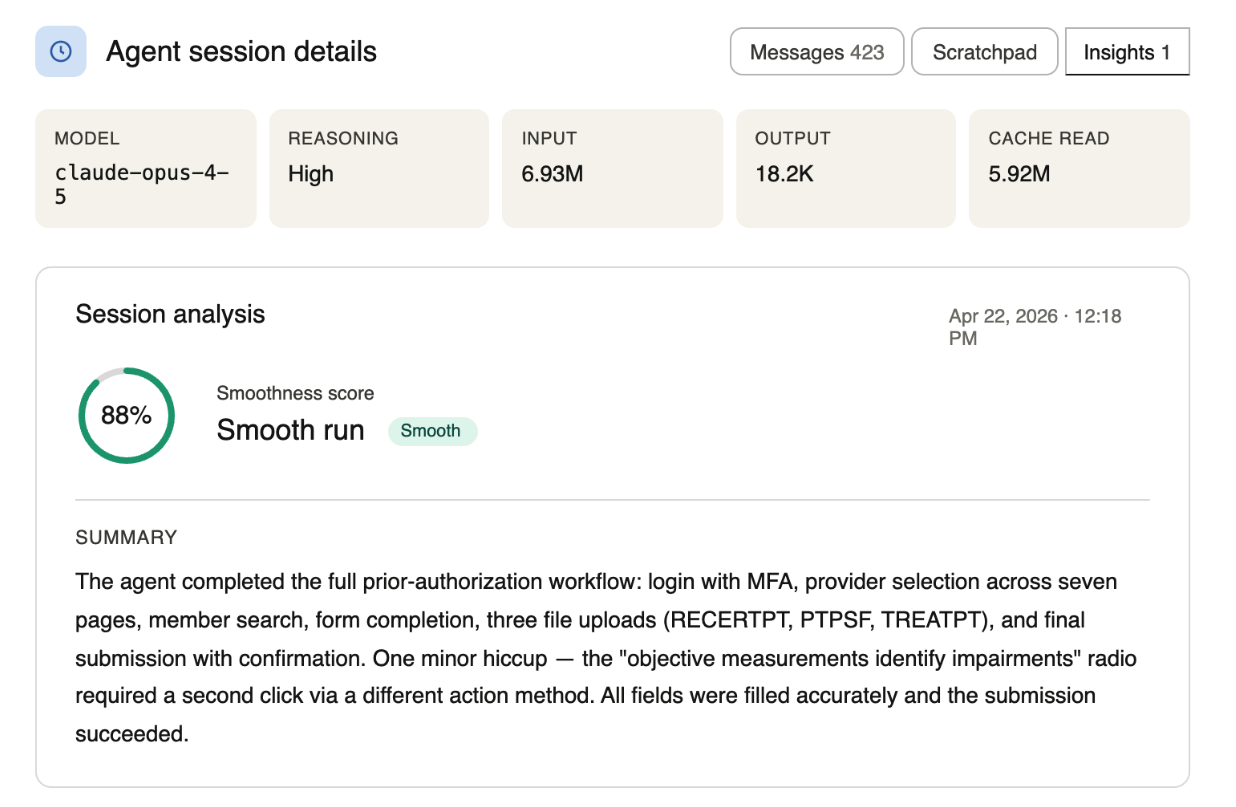
Gauging success by whether the browser agent successfully clicked the "Submit" button on a payor portal is too narrow of a metric to evaluate whether healthcare agents can safely operate in production. The agent could click "Submit" and obtain an auth reference number while still going off the rails mid-session, such as retrying the same action six times, claiming to see a UI element not visible on the screen, or incorrectly entering fields due to hallucinations. We built an evaluation system to score runs with a confidence level: a 0-to-100 insight signal generated at session completion that assesses execution quality independently of the final outcome. From this, we are able to maintain a codified version of failure patterns, like logic loops, excessive retries, hallucinations, and agent confusion. This is made possible by how our agent pipelines are structured, as every inference call and every tool execution is its own pipeline step persisted to our database. With this method, we have direct visibility into the entire session at a granular level. We see every tool call, inference steps, retries, errors, how long each step took, and the full metadata around the action. This foundation is why even when scores drop across a cohort of sessions, we can quickly identify what's going wrong at a structural level rather than debugging individual runs.
Evaluating LLMs
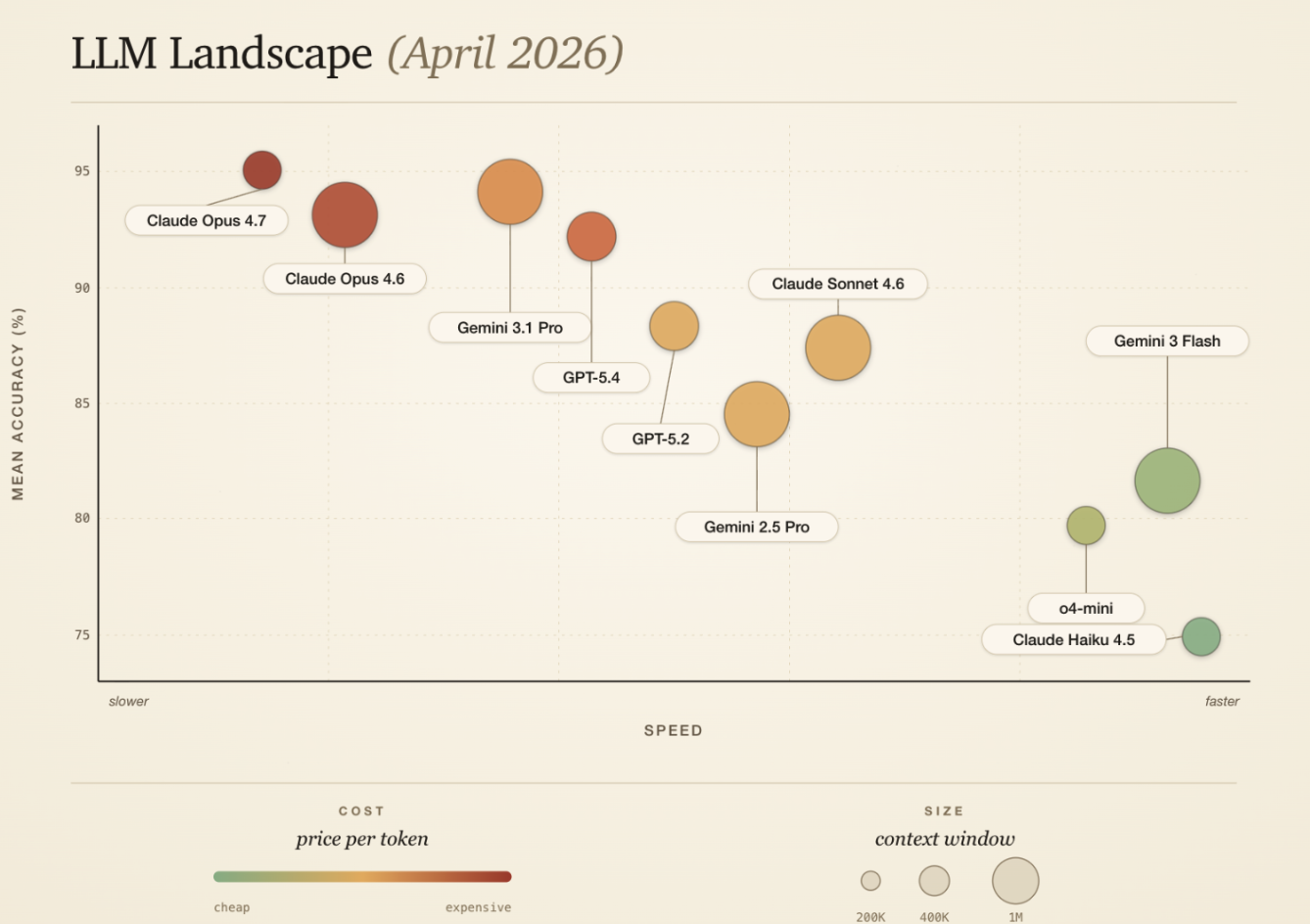
As we continue to scale, the number of available models that we can use continues to grow. Different portals require different models to handle their unique attributes. There are multiple dimensions that we need to consider in order to decide on the best model to be used, such as cost, context window, intelligence, and speed. Some portals can be tricky to navigate with complicated conditioning on how to handle different fields where maintaining long context is important, whereas some portals can be extremely simple but require speed because of a logout time limit. Therefore, each browser agent we set up has its own configuration where we can select the model best suited for the portal. Our agent sandbox environment, which uses the same infrastructure our production agents use, allows us to evaluate model performance.
Additionally, if our testing shows that two models perform equally well, we have the ability to configure a weighted distribution for production testing. For example, by setting 50% to Haiku-4.5 and 50% to GPT-5.4, we will randomly assign either model, based on the percentages, to the portal agent. After enough runs, we can compare duration, token usage, and accuracy to empirically decide which model performed better.
Time-constraining Browser Agents
Our agents don't run indefinitely. Every session is a real prior authorization that a patient and a provider are waiting on. We hold ourselves to one-day turnaround times, so we set time limits on agent sessions and automatically close them when time is up. If an agent timed out, then it's almost always a signal to us that there's something we can improve upon, and whether it's a prompt change, a different model, or a new tool that needs to be built to support the agent, we're always setting high standards for our agents and the system we build around it in order to provide for our patients' needs.
Mitigating Risk
Getting our browser agents to work unlocked the submission method for 50% of our authorizations, but there's a lot that we do behind the scenes to make sure we're protecting the patient's information and upholding the standards of healthcare security.
For example, while the agent is navigating through the browser, we keep tight guardrails on the websites the agent can access. Each portal has a set of approved pages and a starting URL that is implemented by setting Chrome's URL blocklist to *, blocking everything, only allowing the browser access to the portal's approved domain and subdomains. Similarly, we lock down Chrome's extension settings by default. This guarantees the browser can't be tricked into entering data into a different website we didn't approve for the session.
Additionally, mistakes are bound to happen during the portal session, which is why we built an auto validator. Every turn of the agent's loop, we take a fresh screenshot, hand it to a separate model alongside the underlying page structure, and ask it to verify whether what's actually on screen lines up with what the agent was trying to accomplish. That second opinion gets handed back to the agent as part of its next prompt, so that it always has a fresh read on where things actually stand. This allows us to catch drift as it happens, not after the fact.
These defense-in-depth layers are what let us trust an agent with real customer data and give us confidence in the result.
Designing QA Systems
Scaling automation is like manufacturing Advil. You don't inspect every pill after you deem it production-ready when it reaches a certain threshold; you design the production line so each step consistently produces the right outcome. Quality comes from tightly controlled processes, in-line checks, and sampling that detects issues early. When something goes wrong, you trace it back to the exact step and fix the system, not just the individual output.
We built our in-house Experiments platform to own the routing mechanism for which prior authorizations are being auto-submitted and QA'd. Through Experiments, we can set exactly what percentage of prior authorizations are auto-submitted, meaning no human touch, so we can compare human and AI results with varying proportions depending on what phase of the experiment the portal is in. Additionally, it allows us to route a percentage of browser agent submissions to human QA to confirm the agent worked as intended. Our configurations allow us to be incremental in our approach, adjusting auto submission for whole payors. Eventually, we gradually reduce the percentage of human QA review as we collect feedback and metrics.
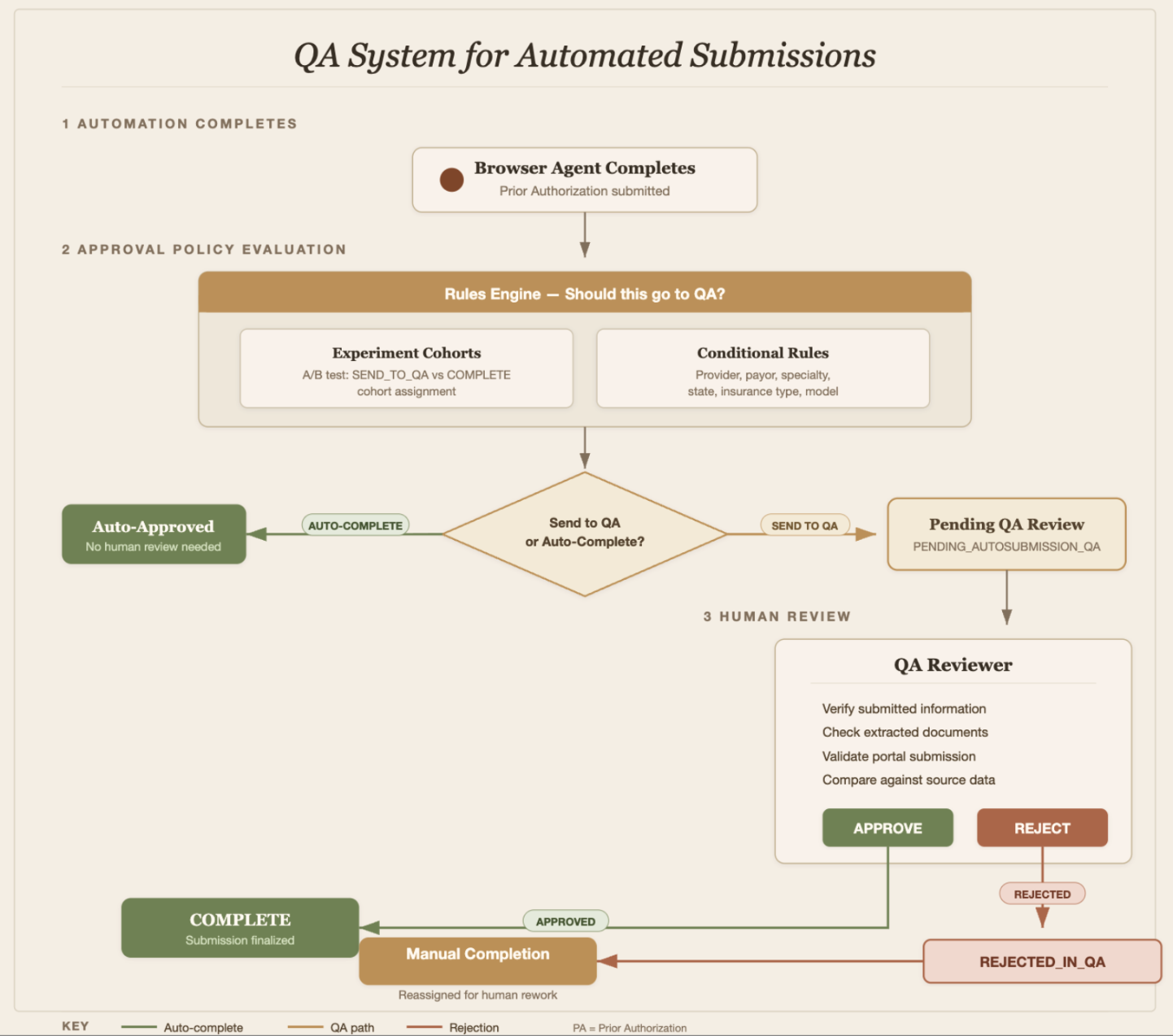
In our QA platform, our specialist reviewers can override completed agentic submissions by flagging either minor or major errors, leaving comments, and then manually fixing these issues. This gives us a clean dataset of where the agent was wrong and what the right answer was, making the human-AI handoff even more of an iterative loop, rather than just a static condition. Our AI Operations team continuously reviews specialist feedback to implement prompt fixes, technical improvements, and backtesting to ensure solutions are effective.
Scaling Beyond the Limits of Human Throughput
Today, every new payor-specialty combination requires manual configuration: writing agent prompts, setting up portal credentials, defining payor-specific rules, and tuning tool access. That configuration layer is now the bottleneck. The next phase of AI Operations is automating it, shifting from humans configuring each agent to systems that can generate, test, and refine those configurations themselves. This moves AI Operations from hands-on-keyboard deployment to designing and implementing the technical and operational systems that do the deploying.
Join our team
Found this interesting? We're building the future of healthcare technology and looking for talented engineers to join us.
View open positions